
For the first week, I focused on setting up the project, rendering a triangle with a color applied on it and then rendering a square with textures applied on it.
Project Setup: I’m using the following external libraries for the project.
- Glfw: For window creation, user input etc.
- Glad: To determine OpenGL extensions on the target platform.
- stb_image: To load textures of different format.
- Glm: To represent the math structures like vectors & matrices and perform math calculations like translation, rotating, scaling etc.
I created a window using Glfw, setup my viewport and created an update loop.
Rendering a triangle: Apparently, it takes some time to a render a triangle for the first time. I declared an array of floats for the vertices(NDC) of my triangle and placed them inside the vertex buffer. I specified the format of the vertex buffer which will be used by the shader. I wrote a simple vertex shader which sets the position of the vertices of the triangle. I also wrote a simple fragment shader which sets the color for each fragment to be rendered on the screen. The triangle was rendered with the color set in the fragment shader.
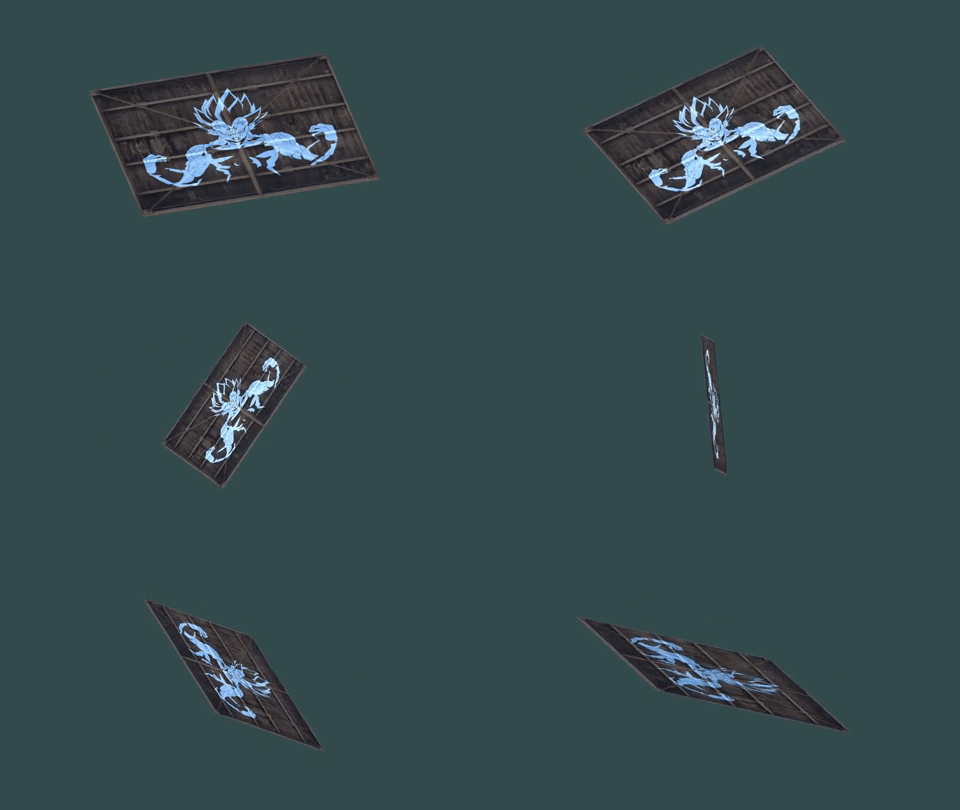
Rendering a square with textures: After rendering a triangle, I immediately moved on to render a square by using 2 triangles. I used the element buffer to avoid duplication of the vertices. I created an index array containing the order of the vertices to be drawn that make a square and placed them in the element buffer. I specified the format of the element buffer similar to how I specified the format of the vertex buffer. To apply the texture for the created square, I had to load the texture (using stb_image), bind it, set magnification and minification filtering properties for it and finally map its coordinates to the square. I added the texture coordinates into the previously specified vertex array which would be placed in the vertex buffer. I used the vertex shader to simply forward the texture coordinates to the fragment shader. I mapped the texture coordinates in the fragment shader. I also loaded another texture and mapped it on top of the square and added a simple rotation. Here is how the output looked after my first week of progress:
 Nishanth Sundharesan